Visualizing a Point Cloud#
This tutorial uses SimulationManager.visualize_point_cloud() to display
a color-coded point cloud in the native DexSim viewer. It is useful for
inspecting sampled workspaces, sensor output, and other point-based data in the
same coordinate frame as a simulation scene.
The Code#
The tutorial corresponds to visualize_point_cloud.py in
scripts/tutorials/sim.
Code for visualize_point_cloud.py
  1# ----------------------------------------------------------------------------
  2# Copyright (c) 2021-2026 DexForce Technology Co., Ltd.
  3#
  4# Licensed under the Apache License, Version 2.0 (the "License");
  5# you may not use this file except in compliance with the License.
  6# You may obtain a copy of the License at
  7#
  8#     http://www.apache.org/licenses/LICENSE-2.0
  9#
 10# Unless required by applicable law or agreed to in writing, software
 11# distributed under the License is distributed on an "AS IS" BASIS,
 12# WITHOUT WARRANTIES OR CONDITIONS OF ANY KIND, either express or implied.
 13# See the License for the specific language governing permissions and
 14# limitations under the License.
 15# ----------------------------------------------------------------------------
 16
 17"""Visualize a deterministic RGB point cloud with DexSim.
 18
 19Run with::
 20
 21    python scripts/tutorials/sim/visualize_point_cloud.py
 22
 23Render one frame with an offscreen camera, without opening a native window::
 24
 25    python scripts/tutorials/sim/visualize_point_cloud.py --headless
 26
 27The viewer should show red X, green Y, and blue Z point axes. The script uses
 28``uint8`` per-point colors to exercise the color normalization in
 29``SimulationManager.visualize_point_cloud``.
 30"""
 31
 32from __future__ import annotations
 33
 34import argparse
 35import time
 36from pathlib import Path
 37
 38import numpy as np
 39from PIL import Image
 40
 41from embodichain.lab.sim import SimulationManager, SimulationManagerCfg
 42from embodichain.lab.visualization import VisualizationCfg
 43from embodichain.utils import logger
 44from embodichain.utils.math import look_at_to_pose
 45
 46CAMERA_EYE = (2.0, -2.0, 1.5)
 47CAMERA_TARGET = (0.0, 0.0, 0.35)
 48CAMERA_UP = (0.0, 0.0, 1.0)
 49FRAME_WIDTH = 1280
 50FRAME_HEIGHT = 720
 51DEFAULT_OUTPUT_PATH = Path("outputs/point_cloud_visualization.png")
 52
 53
 54def build_demo_point_cloud(
 55    num_points_per_axis: int = 120,
 56) -> tuple[np.ndarray, np.ndarray]:
 57    """Build a color-coded three-axis point cloud for visual inspection.
 58
 59    Args:
 60        num_points_per_axis: Number of points rendered for each axis.
 61
 62    Returns:
 63        Point positions with shape ``(3 * N, 3)`` and ``uint8`` RGB colors
 64        with the same leading dimension.
 65    """
 66    horizontal = np.linspace(-0.75, 0.75, num_points_per_axis, dtype=np.float32)
 67    vertical = np.linspace(0.05, 1.25, num_points_per_axis, dtype=np.float32)
 68    ground_height = np.full_like(horizontal, 0.05)
 69    zeros = np.zeros_like(horizontal)
 70
 71    x_axis = np.column_stack((horizontal, zeros, ground_height))
 72    y_axis = np.column_stack((zeros, horizontal, ground_height))
 73    z_axis = np.column_stack((zeros, zeros, vertical))
 74    points = np.concatenate((x_axis, y_axis, z_axis), axis=0)
 75
 76    red = np.full((num_points_per_axis, 3), (255, 0, 0), dtype=np.uint8)
 77    green = np.full((num_points_per_axis, 3), (0, 255, 0), dtype=np.uint8)
 78    blue = np.full((num_points_per_axis, 3), (0, 0, 255), dtype=np.uint8)
 79    colors = np.concatenate((red, green, blue), axis=0)
 80    return points, colors
 81
 82
 83def build_camera_pose() -> np.ndarray:
 84    """Build the offscreen camera pose for the point-cloud overview."""
 85    pose = look_at_to_pose(CAMERA_EYE, CAMERA_TARGET, CAMERA_UP)[0].cpu().numpy()
 86    # DexSim cameras use the OpenGL camera-axis convention.
 87    pose[:3, 1] = -pose[:3, 1]
 88    pose[:3, 2] = -pose[:3, 2]
 89    return np.asarray(pose, dtype=np.float32)
 90
 91
 92def render_headless_frame(sim: SimulationManager, output_path: Path) -> None:
 93    """Render the point cloud once with an offscreen camera and save a PNG.
 94
 95    Args:
 96        sim: Simulation containing the point cloud to render.
 97        output_path: PNG destination. Its parent directory is created if needed.
 98    """
 99    camera = sim.get_env().create_camera(
100        "point_cloud_tutorial_camera", FRAME_WIDTH, FRAME_HEIGHT
101    )
102    if hasattr(camera, "is_open") and camera.is_open() is False:
103        camera.open_camera()
104
105    camera.set_world_pose(build_camera_pose())
106    camera.render()
107    frame = np.ascontiguousarray(np.asarray(camera.get_rgb_map())[..., :3])
108    if frame.size == 0:
109        raise RuntimeError("The offscreen camera returned an empty RGB frame.")
110
111    output_path.parent.mkdir(parents=True, exist_ok=True)
112    Image.fromarray(frame).save(output_path)
113    logger.log_info(f"Saved offscreen point-cloud frame to {output_path}.")
114
115
116def parse_args() -> argparse.Namespace:
117    """Parse the tutorial's optional offscreen-rendering arguments."""
118    parser = argparse.ArgumentParser(description=__doc__)
119    parser.add_argument(
120        "--headless",
121        action="store_true",
122        help="Render one PNG with an offscreen camera instead of opening the viewer.",
123    )
124    parser.add_argument(
125        "--output",
126        type=Path,
127        default=DEFAULT_OUTPUT_PATH,
128        help=(
129            "PNG path used with --headless "
130            f"(default: {DEFAULT_OUTPUT_PATH.as_posix()})."
131        ),
132    )
133    return parser.parse_args()
134
135
136def main() -> None:
137    """Create the RGB point cloud and display or render it once."""
138    args = parse_args()
139    sim = SimulationManager(
140        SimulationManagerCfg(
141            width=FRAME_WIDTH,
142            height=FRAME_HEIGHT,
143            headless=True,
144            visualization=VisualizationCfg(),
145        )
146    )
147    try:
148        points, colors = build_demo_point_cloud()
149        sim.visualize_point_cloud(
150            points=points,
151            colors=colors,
152            point_size=8.0,
153            name="rgb_point_cloud_axes",
154        )
155        if args.headless:
156            sim.update(step=1)
157            render_headless_frame(sim, args.output)
158            return
159
160        if not sim.open_window():
161            raise RuntimeError("Unable to open the native DexSim viewer.")
162
163        sim.get_world().get_windows().set_look_at(
164            eye=np.array(CAMERA_EYE, dtype=np.float32),
165            look_at=np.array(CAMERA_TARGET, dtype=np.float32),
166            up=np.array(CAMERA_UP, dtype=np.float32),
167        )
168        logger.log_info(
169            "Point-cloud viewer open: red=X, green=Y, blue=Z. Press Ctrl+C to exit."
170        )
171        while True:
172            sim.update(step=1)
173            time.sleep(1.0 / 60.0)
174    except KeyboardInterrupt:
175        logger.log_info("Stopping point-cloud viewer.")
176    finally:
177        sim.destroy(exit_process=False)
178        SimulationManager.flush_cleanup_queue()
179
180
181if __name__ == "__main__":
182    main()
Building a Verifiable Point Cloud#
The example constructs three orthogonal point axes:
red points along X;
green points along Y;
blue points along Z.
Each color is stored as uint8 RGB. The manager accepts either normalized
[0, 1] values or [0, 255] values, and normalizes the latter before
passing them to DexSim.
def build_demo_point_cloud(
    num_points_per_axis: int = 120,
) -> tuple[np.ndarray, np.ndarray]:
    """Build a color-coded three-axis point cloud for visual inspection.

    Args:
        num_points_per_axis: Number of points rendered for each axis.

    Returns:
        Point positions with shape ``(3 * N, 3)`` and ``uint8`` RGB colors
        with the same leading dimension.
    """
    horizontal = np.linspace(-0.75, 0.75, num_points_per_axis, dtype=np.float32)
    vertical = np.linspace(0.05, 1.25, num_points_per_axis, dtype=np.float32)
    ground_height = np.full_like(horizontal, 0.05)
    zeros = np.zeros_like(horizontal)

    x_axis = np.column_stack((horizontal, zeros, ground_height))
    y_axis = np.column_stack((zeros, horizontal, ground_height))
    z_axis = np.column_stack((zeros, zeros, vertical))
    points = np.concatenate((x_axis, y_axis, z_axis), axis=0)

    red = np.full((num_points_per_axis, 3), (255, 0, 0), dtype=np.uint8)
    green = np.full((num_points_per_axis, 3), (0, 255, 0), dtype=np.uint8)
    blue = np.full((num_points_per_axis, 3), (0, 0, 255), dtype=np.uint8)
    colors = np.concatenate((red, green, blue), axis=0)
    return points, colors
Creating the Native Point Cloud#
Create the simulation headlessly, add the point cloud, then open the native
window after the scene is ready. The name identifies the native DexSim
object, and point_size is measured in renderer pixels.
sim = SimulationManager(
    SimulationManagerCfg(
        width=FRAME_WIDTH,
        height=FRAME_HEIGHT,
        headless=True,
        visualization=VisualizationCfg(),
    )
)
points, colors = build_demo_point_cloud()
visualize_point_cloud accepts point positions with shape (N, 3) and
optional per-point RGB or RGBA colors with shape (N, 3) or (N, 4).
When colors are omitted, the manager renders all points in green. RGBA input is
accepted for compatibility, but the native manager currently renders RGB
colors with opaque alpha.
Running the Tutorial#
Run the tutorial from the repository root:
python scripts/tutorials/sim/visualize_point_cloud.py
The native DexSim window should show a red horizontal X axis, a green
horizontal Y axis, and a blue vertical Z axis. This verifies both point
placement and per-point color handling. Press Ctrl+C in the terminal to
stop the tutorial.
The script explicitly uses destroy(exit_process=False) and then
SimulationManager.flush_cleanup_queue() so its simulation resources are
released before Python exits.
Headless Rendering#
To save a single frame on a machine without a native display, pass
--headless. The tutorial creates an offscreen DexSim camera at the same
overview pose as the interactive viewer, renders once, and then exits:
python scripts/tutorials/sim/visualize_point_cloud.py --headless \
    --output outputs/point_cloud_visualization.png
The resulting image preserves the red X, green Y, and blue Z axes, so it is a portable visual check of both point placement and per-point colors.
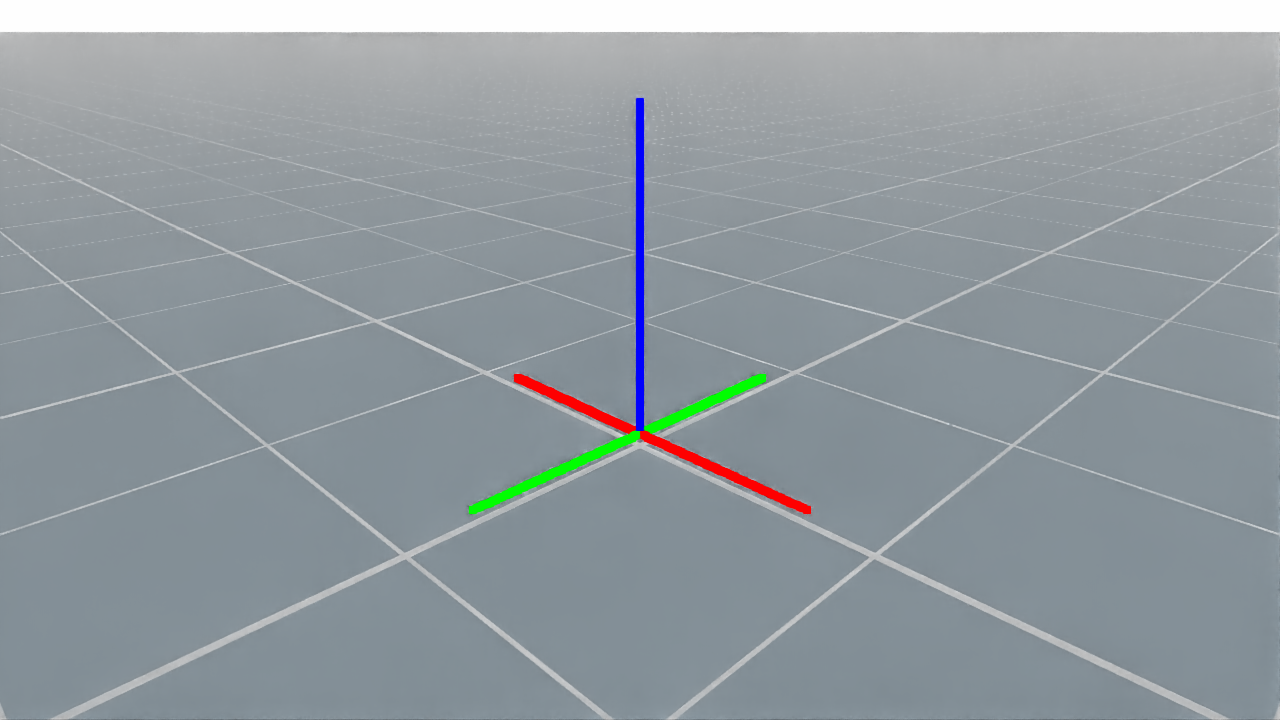
One frame rendered by the tutorial’s offscreen camera.#
Next Steps#
Creating a simulation scene — Add rigid objects and sensors to the same scene.
Simulating a Camera Sensor — Capture and process camera data that can be visualized as point samples.
Simulation Manager — Learn about the simulation lifecycle and the full manager API.